Meet Clevy - our smart AI sales agent!

Build custom forms that simplify talent acquisition  for everyone

Capture the right data, fuel CRM growth, and balance recruiter efficiency with candidate experience.
Privacy compliance from the very beginning

Quality or quantity?
You decide!

From open talent capture to targeted filtering with knock-out questions, design forms that fit every recruiting need.
Centralised storage of GDPR consents

Keep your talent pools clean and organized

New registrations are automatically assigned to the right pools, while follow-up campaigns enrich and refresh profiles without extra effort.
Automated consent management

Build the base for campaigns that deliver
Structured, GDPR-compliant data from your forms powers segmentation and audience-specific campaigns that engage the right talent at scale.

This is what makes CleverConnect CRM Form Builder so special:

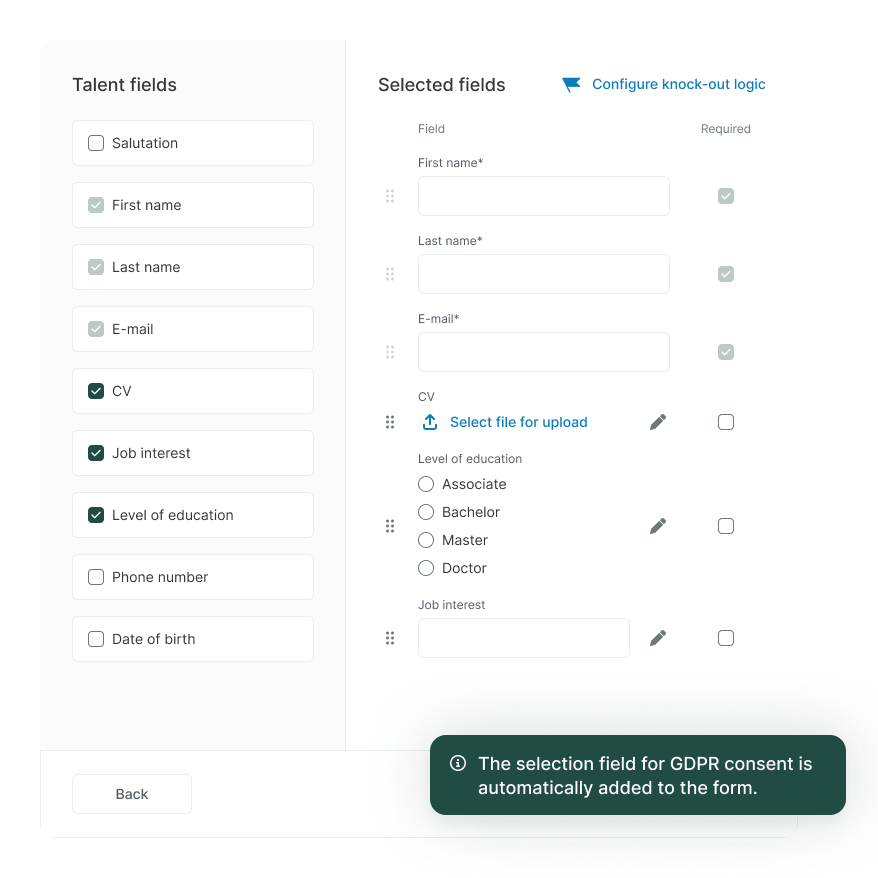
Create compliant forms in minutes, tailored to your needs

  • Create fully customizable forms with custom fields tailored to your recruiting workflows
  • Ensure every submission is GDPR-compliant by default
  • Share forms flexibly: embed on your website, use as a stand-alone link, or generate a QR code instantly
Mockup feature CleverConnect

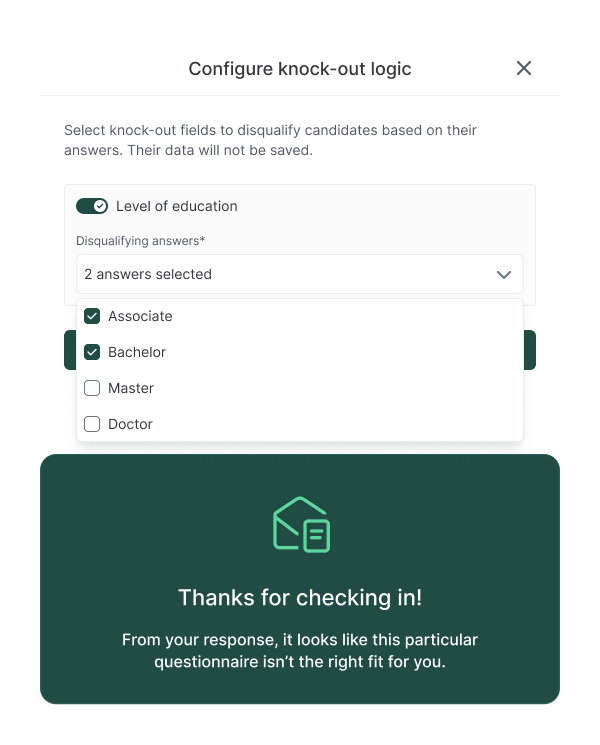
Screen for must-haves efficiently, right from the start

  • Define one or more essential requirements—like certifications, licences, or language skills
  • Knock-out questions appear first, checking fit before the form continues
  • Candidates who don’t qualify see a customizable, friendly message that saves time for both sides
  • Qualified candidates move on automatically, ensuring your CRM only fills with the right profiles
Mockup feature CleverConnect

Manage events professionally and with ease - from registration to follow-up

  • Avoid manual data hygiene—new registrations are structured and assigned to the right pool automatically
  • Add an extra layer of segmentation with auto-assigned tags like seniority, location, or skills
  • Trigger automated campaigns that keep candidates engaged, from welcome emails to event reminders
  • Receive instant alerts when rare or high-priority talent registers, so recruiters can act fast
Mockup feature CleverConnect

The best of both worlds: simple sign-ups, richer profiles

  • Maximize registrations with short forms that only ask for the bare minimum
  • Launch automated follow-up campaigns with prefilled forms, inviting candidates to upload a CV, specify their desired role, or add missing details
  • Re-engage talent over time with update requests that keep profiles fresh and your pools reliable
Mockup feature CleverConnect

Candidate Relationship Management

The Form Builder is an essential part of CleverConnect Candidate Relationship Management (CRM), designed to make your recruiting more efficient and reduce time to hire.

Frequently asked questions (FAQ)

Here are some of the most common questions about CRM Form Builder:
Yes, the Form Builder is very flexible. You can:

.Embed forms directly on your career site or job pages to capture candidate data seamlessly.

.Share stand-alone links in job ads, social media posts, or email campaigns

.Generate QR codes for quick access at events, job fairs, or even offline campaigns

.This way, you can collect candidate data wherever it makes sense for your recruiting strategy.
How does the Form Builder help me stay GDPR compliant?
Every form comes with a GDPR consent checkbox by default, so compliance is built in from the start. You can customize consent texts and privacy policies to match your company’s requirements. Once set up, the entire process—renewal, consent tracking, and even data deletion—is fully automated. All consent information is stored centrally, ensuring compliance without adding manual effort.
How do Knock-out Questions work in the Form Builder?
Knock-out Questions let recruiters filter for must-have criteria—like a certification, driver’s licence, or language skill—directly in the registration form. Recruiters define the disqualifying answers and can set up a friendly message for candidates who don’t meet the requirement.

From the candidate perspective, the knock-out question appears first. If they don’t qualify, they see the customized message right away, saving them time and setting clear expectations. If they do qualify, the rest of the form opens, and their profile is added to the talent pool automatically.

The result: recruiters get clean, specialized pools without manual pre-screening, and candidates enjoy a transparent process from the very start.
How do Follow-up Forms work?
Follow-up Forms let recruiters collect more detailed candidate data without creating friction in the first registration step. The initial form stays short and simple to encourage as many sign-ups as possible. Later, recruiters can send a campaign email inviting candidates to complete a follow-up form—for example, to upload a CV or specify their desired position.

From the candidate perspective, the follow-up form is pre-filled with their existing information, so they only need to add what’s missing if they wish to. This keeps the process quick and user-friendly, while giving recruiters richer profiles and better-qualified talent pools.

Request a personalized demo

You want to save Hiring Costs & Boosts Applications? We’re here to show you how!
Speed up your Talent Acquisition strategy Mockup
Meet Clevy ― our smart AI sales agent